> For the complete documentation index, see [llms.txt](https://doc.txhub.io/llms.txt). Markdown versions of documentation pages are available by appending `.md` to page URLs; this page is available as [Markdown](https://doc.txhub.io/quick-guides.md).
# Quick Guides
로그인하면 Dashboard가 표시됩니다. 메뉴에는 **5개의 탭**이 있습니다.
{% tabs %}
{% tab title="Dashboard" %}
생성된 테스트 목록, 이전 테스트 실행에 대한 정보를 월별, 전체 현황으로 확인할 수 있습니다.
{% endtab %}
{% tab title="Performance Test" %}
테스트 시나리오, 플랜 및 스케줄을 작성 및 조회 가능하며 테스트 조회결과를 즉시 확인할 수 있습니다.
{% endtab %}
{% tab title="Functional Test" %}
TestSandbox에서 바로 테스트 해볼 수 있으며 sandbox생성 및 목록 확인이 가능합니다.
{% endtab %}
{% tab title="게시판" %}
공지 게시판 및 QnA 메뉴를 확인할 수 있습니다.
{% endtab %}
{% tab title="User" %}
사용자 프로필과 회사 및 계약 정보를 확인할 수 있습니다.
{% endtab %}
{% endtabs %}
## 1) 시나리오 빌더
실제 사용자의 사용 시나리오와 유사하게 테스트가 가능하도록 시나리오 작성 및 조회 기능을 제공합니다.
{% tabs %}
{% tab title="테스트 시나리오 작성" %}
자세한 내용은 가이드를 참조하세요.
{% content-ref url="/pages/XRf2dB5cSlQGg4X89t1F" %}
[테스트 시나리오 작성](/test-manual/test-scenario-builder/test-scenario-setting.md)
{% endcontent-ref %}
{% endtab %}
{% tab title="테스트 시나리오 조회" %}
> 해당 시나리오의 작업(시나리오, 플랜, 스케줄의 작성 및 스케줄 실행, 종료)시 알림 메일 수신자 설정할 수 있습니다.
자세한 내용은 가이드를 참조하세요.
{% content-ref url="/pages/BWEK5OMCBqbUGjvUY2Fd" %}
[테스트 시나리오 조회](/test-manual/test-scenario-builder/test-scenario-list.md)
{% endcontent-ref %}
{% endtab %}
{% endtabs %}
## 2) 플랜 작성 및 즉시 실행
테스트를 위한 동시접속자 수, 지속시간 등 실행 계획 설정 가능하며 즉시 실행이 가능합니다.
{% tabs %}
{% tab title="테스트 플랜 작성" %}
자세한 내용은 가이드를 참조하세요.
{% content-ref url="/pages/IiGwIlomENIkW3C1KHnf" %}
[테스트 플랜 작성](/test-manual/test-planning/test-plan-setting.md)
{% endcontent-ref %}
{% endtab %}
{% tab title="테스트(플랜) 실행" %}
* **Dry Run**: 선택된 시나리오를 바탕으로 약간의 부하를 주어 시나리오 검증 및 타겟 환경 정검을 하는 사전 테스트(billing 제외)
* **Run Test**: 선택된 Plan 정보를 바탕으로 테스트를 수행
테스트 실행 시 결과 조회하면 페이지로 이동 됩니다.
{% endtab %}
{% endtabs %}
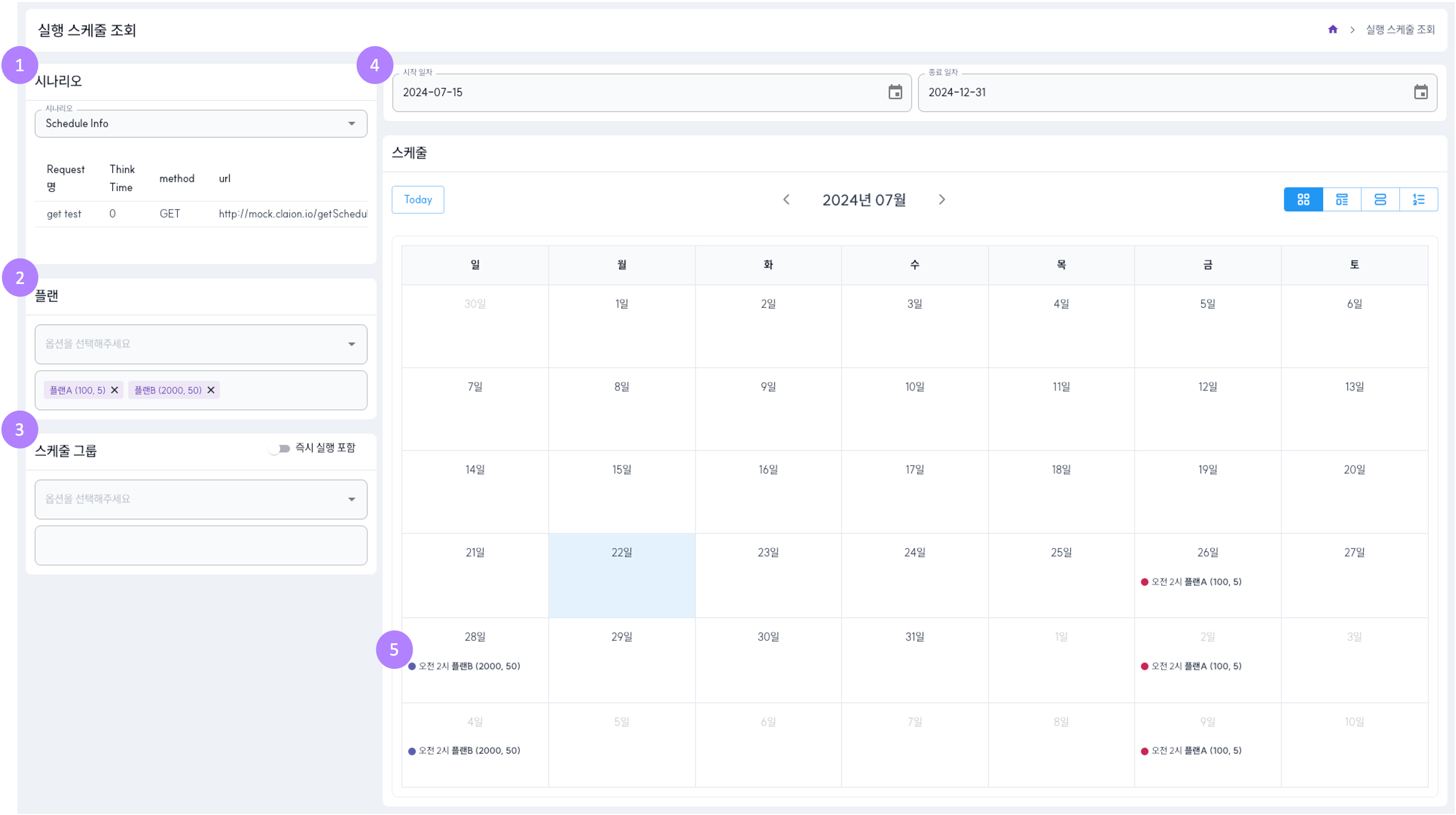
## 3) 실행 스케줄 작성 및 조회
지속적이고 주기적인 테스트를 위한 스케줄 설정 기능을 제공합니다.
{% tabs %}
{% tab title="실행 스케줄 작성" %}
자세한 내용은 가이드를 참조하세요.
{% content-ref url="/pages/Jj1nZ4zxqh9pNfTjX103" %}
[실행 스케줄 작성](/test-manual/test-scheduling/test-schedule-setting.md)
{% endcontent-ref %}
{% endtab %}
{% tab title="실행 스케줄 상세, 수정, 삭제" %}
자세한 내용은 가이드를 참조하세요.
{% content-ref url="/pages/J7vtQzEYbvjXSvYmEn2K" %}
[실행 스케줄 상세, 수정, 삭제](/test-manual/test-scheduling/test-schedule-edit.md)
{% endcontent-ref %}
{% endtab %}
{% tab title="실행 스케줄 조회" %}
자세한 내용은 가이드를 참조하세요.
{% content-ref url="/pages/k0C54dpX9cDhtYckUfaG" %}
[실행 스케줄 조회](/test-manual/test-scheduling/test-schedule-list.md)
{% endcontent-ref %}
{% endtab %}
{% endtabs %}
## 4) 실행 결과 조회
실행된 테스트 결과를 상세하게 제공합니다.
{% tabs %}
{% tab title="실행 결과 조회" %}
자세한 내용은 가이드를 참조하세요.
{% content-ref url="/pages/r0yA7xH5PrlJad2NkGoY" %}
[실행 결과 조회](/test-reporting/test-reporting.md)
{% endcontent-ref %}
{% endtab %}
{% tab title="실행 결과" %}
{% hint style="info" %}
자세한 정보는 아래 링크 페이지에서 참조하세요.
{% endhint %}
### Summary
{% content-ref url="/pages/QVsQ9Nazs2w1bXVs9VrJ" %}
[Summary](/test-reporting/test-reporting/summary.md)
{% endcontent-ref %}
### Result
{% content-ref url="/pages/JHvIfwDg151u0fMlzlIf" %}
[Result](/test-reporting/test-reporting/result.md)
{% endcontent-ref %}
### Error
{% content-ref url="/pages/KNmeqz5X8h4N3Hg5vlcC" %}
[Error](/test-reporting/test-reporting/error.md)
{% endcontent-ref %}
### Logs
{% content-ref url="/pages/yklCCYODVdPt26jGdwQn" %}
[Logs](/test-reporting/test-reporting/logs.md)
{% endcontent-ref %}
### Download
{% content-ref url="/pages/X4zUeyA208UVpTnGt97R" %}
[Download](/test-reporting/test-reporting/download.md)
{% endcontent-ref %}
### Test Configuration
{% content-ref url="/pages/YwhdJbRl718ZPuyYflfR" %}
[Test Configuration](/test-reporting/test-reporting/test-configuration.md)
{% endcontent-ref %}
{% endtab %}
{% endtabs %}